AI in SketchUp: Generate Concept Renders in Seconds with Diffusion
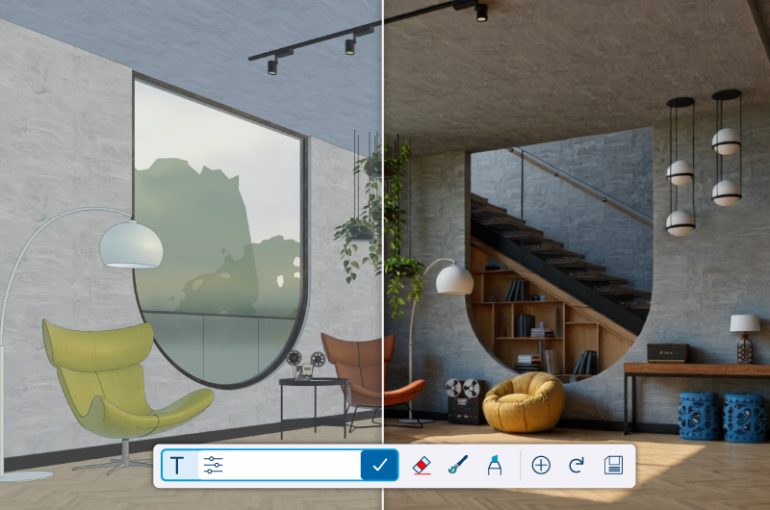
The future of architectural visualization is no longer coming — it’s already here.
In 2026, AI rendering in SketchUp has moved from experimental to essential. What once required hours of manual material tweaking, lighting adjustments, and post-production editing can now be achieved in seconds using generative AI tools powered by diffusion models.
With the release of SketchUp 2026 and the rapid growth of AI-powered extensions, designers can now transform simple 3D massing models into atmospheric, photorealistic concept renders almost instantly.
If you’re still relying only on traditional rendering workflows, you’re missing one of the biggest productivity shifts in architectural visualization.
What Is “Diffusion” AI in SketchUp?
“Diffusion” refers to a category of generative AI models capable of creating detailed images from text prompts and reference images.
Popular examples include:
- Stable Diffusion
- Midjourney
- DALL-E
These AI systems analyze patterns from massive image datasets and generate entirely new visuals based on written instructions.
When integrated into SketchUp via plugins, diffusion AI tools combine:
- Your live 3D viewport
- A written design prompt
- AI-powered image synthesis
The result? A high-quality concept render that enhances your geometry with realistic lighting, materials, textures, and environmental context.
How AI Rendering Works Inside SketchUp
Here’s a simplified workflow:
1. Start with Your SketchUp Model
You begin with a block model or conceptual massing study. No need for advanced materials or detailed textures.
2. Write a Prompt
Describe your design intent, such as:
“Modern minimalist cabin in a snowy forest, glass facade, warm interior lighting, cinematic evening atmosphere.”
3. Let AI Generate the Image
The diffusion plugin interprets both:
- Your model geometry
- Your text description
It then produces a stylized, photorealistic concept render with enhanced lighting, mood, and environmental details.
Instead of adjusting sun angles, HDRIs, reflection maps, and render presets, you iterate using language.
Why AI Rendering Is a Game-Changer for SketchUp Designers in 2026
1. Rapid Concept Exploration
With traditional rendering engines, exploring 20 material palettes or environmental conditions could take an entire day.
With AI-powered SketchUp visualization, you can test:
- Different façade materials
- Day vs. night scenes
- Seasonal variations
- Urban vs. natural contexts
- Interior styling concepts
All within an hour.
This dramatically accelerates early-stage design decision-making.
2. Bridging the Gap Between 3D Modeling and Photorealism
Native SketchUp models — even clean ones — often look flat without advanced rendering engines.
Diffusion AI enhances your model with:
- Realistic textures
- Soft global illumination
- Atmospheric depth
- Natural shadows
- Landscape context
The result is a compelling visual that resonates emotionally with clients.
For client presentations, this means stronger storytelling and faster approvals.
3. Eliminating Rendering Hardware Barriers
Traditional photorealistic rendering typically requires:
- High-end GPUs
- Rendering farms
- Expensive cloud credits
AI rendering tools are optimized differently. Many diffusion plugins:
- Run locally on mid-range GPUs
- Use lightweight cloud processing
- Generate images in seconds instead of hours
This makes advanced visualization accessible to small studios, freelancers, and design students.
Best AI Tools for SketchUp in 2026
Several AI-driven workflows are emerging inside the Extension Warehouse and beyond.
Stable Diffusion Plugins for SketchUp
Many community-driven extensions embed Stable Diffusion directly inside SketchUp.
Benefits include:
- Direct viewport integration
- Custom prompt controls
- Adjustable strength settings
- Seed image variation
These are ideal for designers who want tight control over image refinement.
Midjourney & DALL-E (External Workflow)
Tools like Midjourney and DALL-E can take a SketchUp screenshot as an “image prompt.”
Workflow:
- Export a clean viewport image
- Upload it into the AI platform
- Add descriptive text
- Generate stylized variations
This approach often produces more artistic or cinematic results.
NVIDIA Canvas for Environmental Context
While not a SketchUp plugin, NVIDIA Canvas is powerful for creating realistic landscapes.
You can:
- Sketch simple terrain shapes
- Convert them into photorealistic environments
- Import them back into SketchUp
This enhances exterior renderings without heavy manual modeling.
Quick Workflow Guide: Using Diffusion AI in SketchUp 2026
If you’re new to AI rendering, here’s a simple step-by-step process:
Step 1: Set the Camera View
Choose a perspective that highlights your design intent — street view, eye-level, or aerial.
Step 2: Apply Basic Color Blocking
Use simple colors to differentiate elements:
- Green for landscape
- Grey for concrete
- Brown for wood
- Blue for glass
AI interprets color zones as material hints.
Step 3: Launch the Diffusion Plugin
Open your installed AI extension.
Step 4: Enter a Detailed Prompt
Include:
- Architectural style
- Time of day
- Weather conditions
- Lighting mood
- Material tone
Example:
“Contemporary tropical villa, warm sunset lighting, lush greenery, soft shadows, cinematic photography.”
Step 5: Generate & Iterate
Adjust prompts, tweak strength settings, and explore variations until you achieve the desired concept.
Iteration is the real power of AI.
Why AI in SketchUp Is Here to Stay
In 2026, AI is not replacing designers — it’s amplifying creativity.
Instead of spending time:
- Tuning reflection values
- Waiting for render passes
- Adjusting render presets
Designers can focus on:
- Spatial ideas
- Material exploration
- Emotional storytelling
- Client engagement
AI transforms SketchUp from a modeling tool into a concept visualization accelerator.
The New Standard for Architectural Visualization
The combination of SketchUp 2026 and diffusion-based AI plugins represents one of the biggest shifts in architectural rendering workflows in years.
Faster concept renders.
Stronger presentation visuals.
Lower hardware requirements.
Unlimited creative exploration.
For architects, interior designers, and visualization specialists, AI-powered rendering is no longer optional — it’s becoming the new industry standard.
The firms adopting it today will present ideas faster, iterate more boldly, and win client confidence earlier in the design process.