SketchUp Importer for Revit: SketchUp to Revit Made Easy
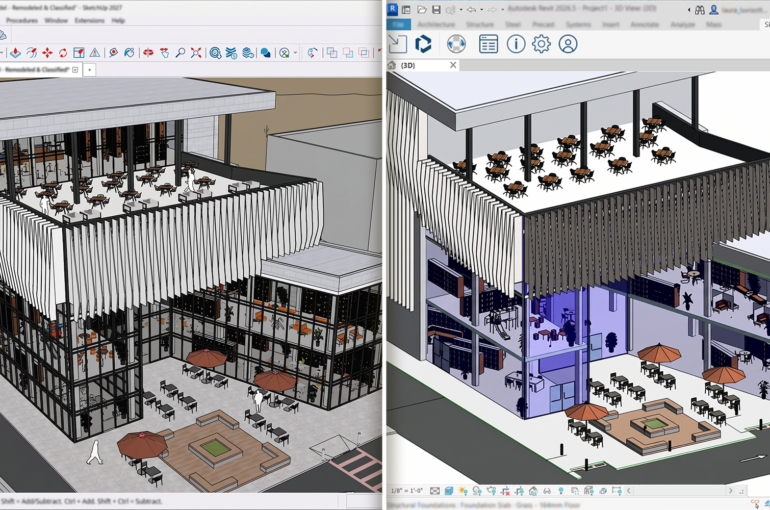
SketchUp Importer for Revit: Move from Concept to BIM Documentation with Ease
SketchUp is where great designs begin, and Revit is where many of them are documented and delivered. Until now, moving a model from one to the other often meant hours, or even days, of remodeling. The new SketchUp Importer for Revit, an extension included with SketchUp Pro Advanced Workflows and SketchUp Studio subscriptions, closes that gap with a simple, predictable import pipeline from SketchUp to Revit.
Bridge Creative Design and Detailed Documentation
The SketchUp Importer for Revit lets you keep the creative freedom of early-stage design in SketchUp, then carry that work straight into Revit for detailed documentation. Your design intent comes across intact, so there’s no need to rebuild models from scratch or juggle disconnected setups.
Key Features and Benefits
Native Revit families. The importer converts SketchUp 3D geometry into native Revit families, so your imported content behaves like it belongs in your BIM project.
Materials, PBR properties and tags preserved. Materials, physically based rendering (PBR) properties and tags carry over, keeping your model organized and visually accurate.
Save up to a week of remodeling. By removing manual rework, the importer can save your team up to a week of remodeling time on a project.
Easy element management. A dedicated SketchUp panel inside Revit makes it simple to manage imported elements.
One source of truth. Keep architects, designers and documentation teams aligned on the same model data across the project.
Local or cloud access. Open files from local storage or directly from Trimble Connect, Trimble’s cloud collaboration platform.
Support for project compliance. Deliver in Revit when bidding requirements or project mandates call for it, without giving up your SketchUp design workflow.
Who Should Use the SketchUp Importer for Revit?
This extension is built for architecture firms, interior designers, engineers and construction teams that work across both SketchUp and Revit. It’s especially valuable for practices that design and present concepts in SketchUp but must deliver BIM documentation in Revit for clients, consultants or tenders.
Available in SketchUp Pro Advanced Workflows and Studio
The SketchUp Importer for Revit is included with SketchUp Pro Advanced Workflows and SketchUp Studio subscriptions. If you’re on either plan, you can download the extension from the SketchUp Help Center, which also covers installation and setup.
Using SketchUp Go or standard SketchUp Pro? Upgrading to Pro Advanced Workflows or Studio gives you access to the importer, along with other advanced tools for professional design-to-BIM workflows.
Upgrade Your SketchUp Subscription with PCSSB
Progressive Computer Systems Sdn Bhd (PCSSB) is an authorized SketchUp reseller and Autodesk Gold Partner in Malaysia. Whether you’re upgrading to SketchUp Pro Advanced Workflows or Studio, adding Revit to your workflow, or setting up Trimble Connect for your team, we provide licensing advice, local support and training.
Ready to streamline your SketchUp to Revit workflow? Contact us for a demo, pricing or help choosing the right SketchUp subscription.